Schedule of condition app
For party wall surveyorsPhotograph each defect, say what you see, and have a numbered, room-by-room schedule before you leave the property.
- Room by roomType the room once. Every photo after it goes under that room until you change it.
- PhotoOne tap for each crack, stain, loose fitting or open joint.
- SpeakDescribe it out loud: location, size, extent. It is typed for you, and you can edit it.
- ScheduleA PDF to issue, or a Word file to edit and agree with the other surveyor.
What the schedule looks like
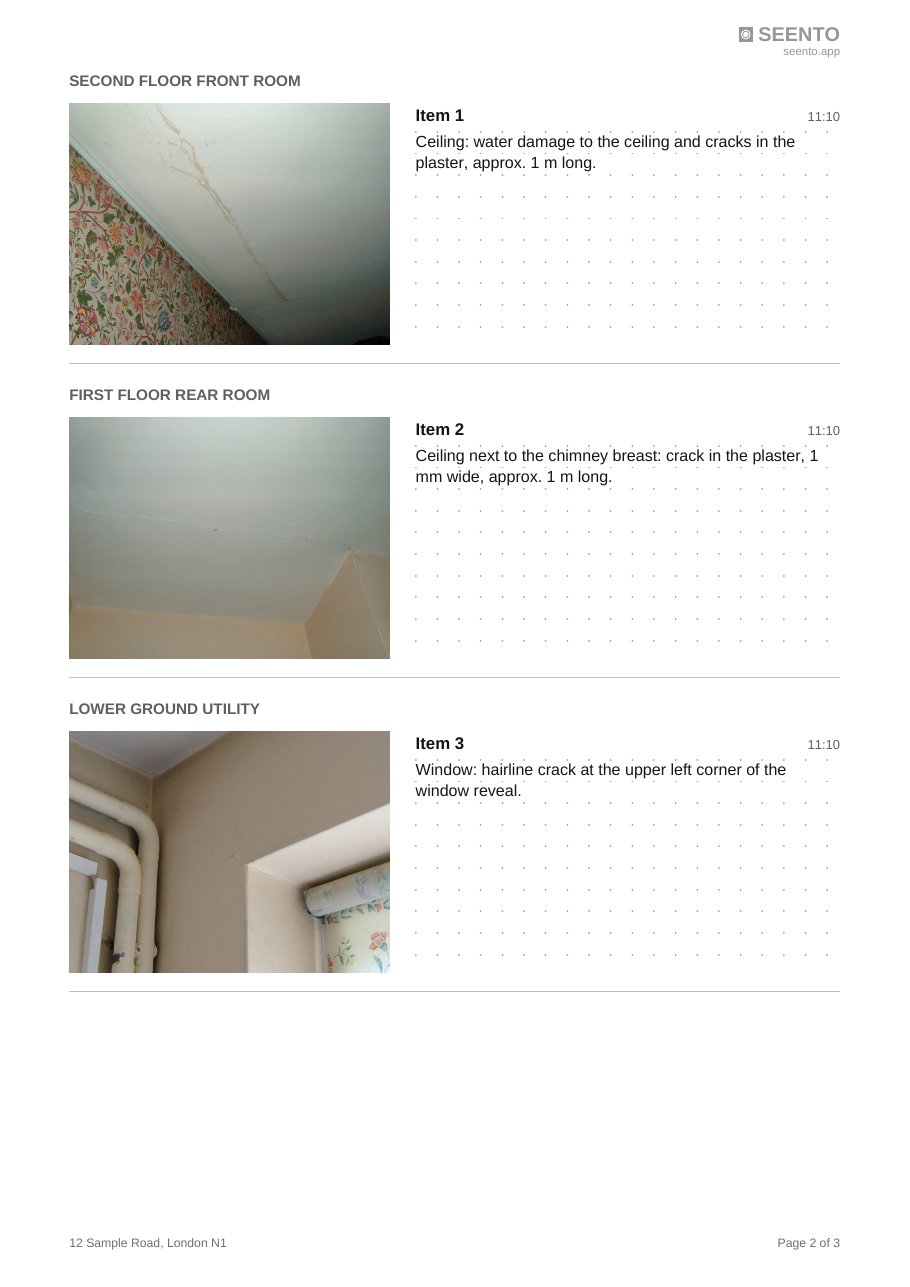
Made for the way a schedule is done
- Numbered items, grouped by room. Go back to a room later in the visit and the photos still file under it, so everyone can refer to “item 14”.
- A Word file as well as a PDF. Edit the wording, add your own clauses, and send it for agreement.
- No setup. No company profile, templates or training before your first photo. Open it and start.
- Works in basements and lofts. Once opened, it carries on with no signal.
- The client’s photos stay on your phone. Nothing is uploaded to us.
- Made from over 20 years’ experience of managing construction projects.
Questions
Does it work without signal?
Yes, once it has been opened on your phone. Photos and notes are saved on the phone as you go, so a basement or loft with no signal is not a problem.
Can I edit the descriptions?
Yes. Every note can be edited on the photo screen or on the report screen before you make the file, and the Word version can be edited afterwards like any other document.
How are items numbered?
Items are numbered in the order they appear in the schedule: photos with no room first, then each room in the order you first visited it, with all of that room's photos together.
Do I need to set anything up first?
No. There is no company profile or template to fill in. You can type the address, your name and a report title, but you can take the first photo straight away.
Where are the photos kept?
On your phone, in the browser you use. They are not uploaded to us. Save the PDF or Word file to keep a copy elsewhere.
Does it work on iPhone and Android?
Yes. It opens in Safari on an iPhone or Chrome on Android, and can be added to your home screen like an app.
Can I put my own logo on the schedule?
The paid version will replace the Seento mark with your own logo. During testing, ask us at [email protected].
Join the waiting list
Seento is being tested by architects and surveyors on real jobs. Leave your email and we will tell you when it is ready, or email us on [email protected].
Your details are held by FCA Design Ltd and used only to send you news about Seento. We will not pass them to anyone else. To be removed, reply to any email from us or write to [email protected]. Read the privacy notice.